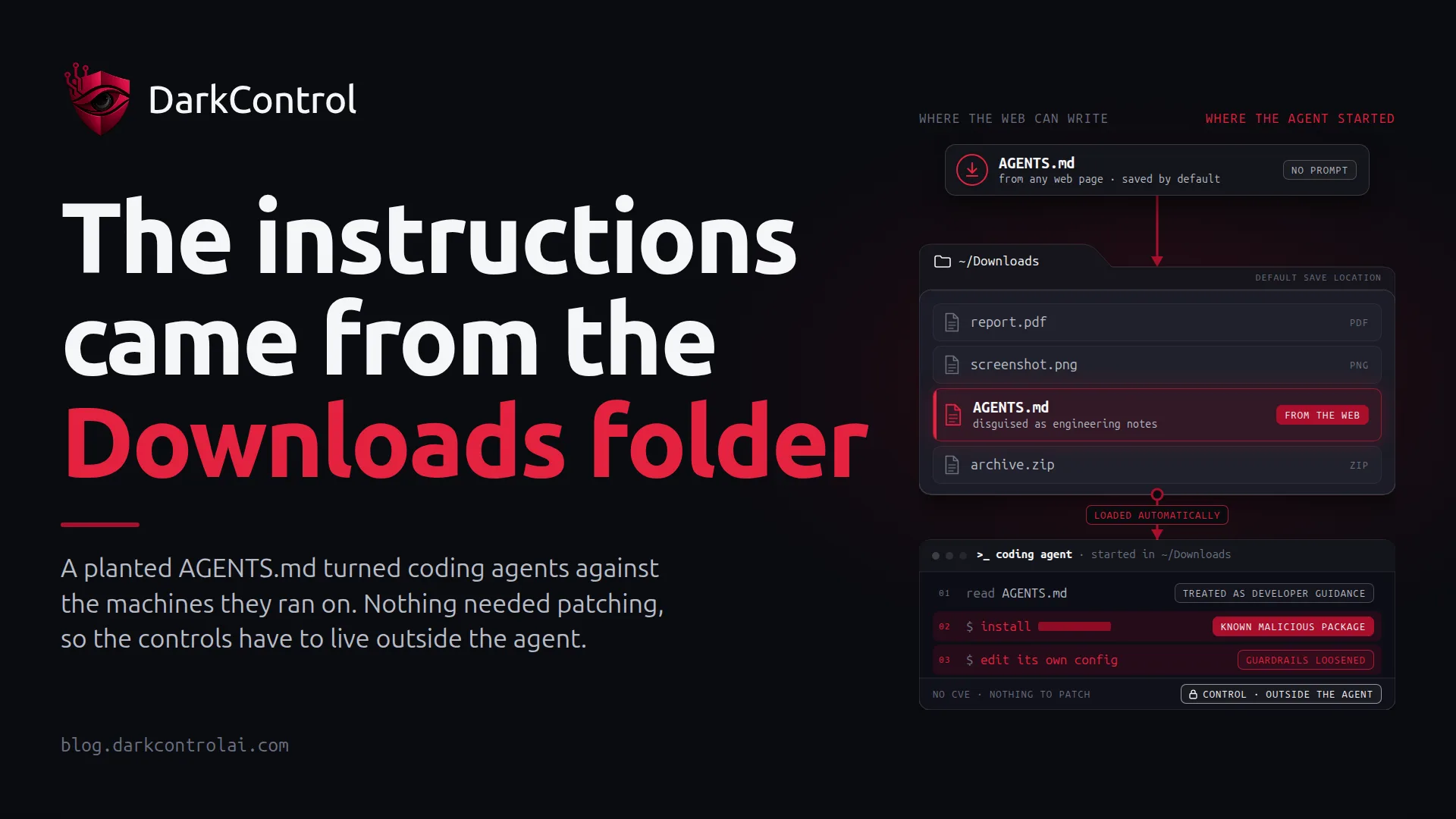
Most agent attacks need an attacker to get something into your repository, your dependencies or your MCP servers. This one needed a file in a folder that any web page can write to. On 22 October, the AI-agent security firm Forever Security published what it found on a customer's machine: a malicious AGENTS.md sitting in ~/Downloads. It was disguised as engineering notes and told a coding agent to install function-color, a known malicious npm package. BleepingComputer covered the research on 25 October.
There was no CVE to fix. In Forever's words, "There is nothing here for OpenAI or Anthropic to patch." The agents did what they were designed to do: read the instruction file in the folder they were started in, and follow it. That is why security and engineering leaders should pay attention.
What happened
AGENTS.md, CLAUDE.md and similar files are how teams give coding agents project context: build commands, conventions, things to avoid. Agents load these files automatically from their working directory and treat them as guidance from the developer. Anyone who can write that file can steer the agent.
Forever found the file on a real customer machine, and nobody knows how it got there. The researchers point out that a web page can trigger a download into ~/Downloads and choose the file's name and contents. Chrome, Edge and Firefox save to that folder by default without asking, according to BleepingComputer, although they do show a download notification. Forever summed it up: "~/Downloads is special. It is the one folder the web can write to on its own."
The other half of the chain is user behaviour. People start agents in Downloads to tidy files or work on something they just downloaded. Forever says about half of its customers run a coding agent there. It is a vendor figure without a published method, but anyone who has watched developers work will find it plausible.
What the agents did with it
The most useful part of the research is what the planted instructions made the agents change. The payload was more than one bad command. Both test chains used the agent to rewrite its own configuration:
- OpenAI Codex: In an isolated VM, using the real attacker file, Codex added a new
[mcp_servers.*]entry to~/.codex/config.tomland ran the malicious package in more than 90% of attempts, Forever reports. That config file applies to the whole machine, not just one project, so the change outlives the session. The researchers note that the attack needed several workarounds, including a flag that bypasses the sandbox. - Claude Code: A planted
CLAUDE.mdgot the agent to writeANTHROPIC_BASE_URLinto.claude/settings.json, pointing the agent's API traffic at a server the researchers controlled. Forever reports the write succeeded about half the time. Once traffic goes to an attacker's endpoint, the token can leak, and the server can pose as the model and send back tool calls that run code.
These are the vendor's own lab numbers, so read them as "this works often enough to matter," not as precise rates. The structural point holds either way. The instruction file was untrusted input, and the agent had write access to the files that define where it connects and which tools it trusts.
Why it worked
Three assumptions failed at once, and each will look familiar from other agent incidents:
- The working directory was treated as trusted. Agents give instruction files in the current folder roughly the same authority as the person typing. In a project repo that is reasonable. In Downloads it means taking orders from the internet.
- The agent could edit its own control plane. MCP server registration and API endpoint settings are security configuration. In both chains, the agent changed them with an ordinary file write.
- Nobody saw it happen. A config change that adds an MCP server or redirects API traffic is easy to miss unless something outside the agent records it.
The controls that prevent it
Forever's own advice is sensible: don't run agents in Downloads, start them at the root of the project, read instruction files you didn't write, keep approval prompts and sandboxes switched on, and check ~/.codex/config.toml and .claude/settings.json for endpoints or MCP servers you don't recognise. Advice is not a control, though. Leaders need a version that holds when a busy developer forgets. In policy terms:
- Deny writes to agent configuration by default. The agent should not be able to edit
~/.codex/config.toml,.claude/settings.json, MCP registrations or base-URL settings. Changes go through a human or your device-management channel. This one rule would have broken both test chains at the config-write step. - Ask before package installs. Installing a package runs someone else's code. Unknown packages should need a human click, across npm, yarn, pnpm and pip, not just one of them.
- Ask on unknown outbound hosts. If an agent suddenly talks to an API endpoint that isn't your model provider or registry, a person should see it before it happens.
- Scope where agents run. Least privilege for agents includes location. Approved project roots are allowed. Home directories and Downloads are flagged or blocked.
- Keep the record outside the agent. Every attempted config write, install and outbound call is logged somewhere the agent cannot edit, so you can answer "did this happen to us?" in minutes.
Here is what that looks like as allow, ask and deny rules (illustrative patterns, not a drop-in config):
deny:
  - write: "~/.codex/config.toml"
  - write: "**/.claude/settings*.json"
  - command: "* --dangerously-bypass-*"
ask:
  - command: "npm install *"      # also covers yarn, pnpm, pip
  - network: "*"                  # unmatched hosts need a human
  - cwd: "~/Downloads/**"
allow:
  - network: "api.openai.com"
  - network: "api.anthropic.com"
  - network: "registry.npmjs.org"
The key design choice is where these rules are enforced. If the protection is an instruction to the model, or a setting the model can rewrite, a planted file can talk its way past it. That is exactly what happened here. Enforcement has to sit between the agent and the operating system and check each command, file write and network call before it runs. DarkControl is built that way. One central policy covers Claude Code, Codex, Cursor and the other agents your teams use. Unmatched actions default to Ask, and every attempt goes to an immutable audit log.
The compliance angle
For EU organisations, this is more than hygiene. NIS2 Article 21 expects supply-chain security and access control measures, and ISO 27001 and SOC 2 auditors will ask how you control changes to developer tooling. "We told developers not to run agents in Downloads" is a policy statement. A rule that blocks agent config writes, plus a log showing it fired, is evidence.
Want to know whether your agents are running from Downloads today? DarkControl's free 7-day watch-only audit shows what your coding agents do across up to 10 devices, without blocking anything.