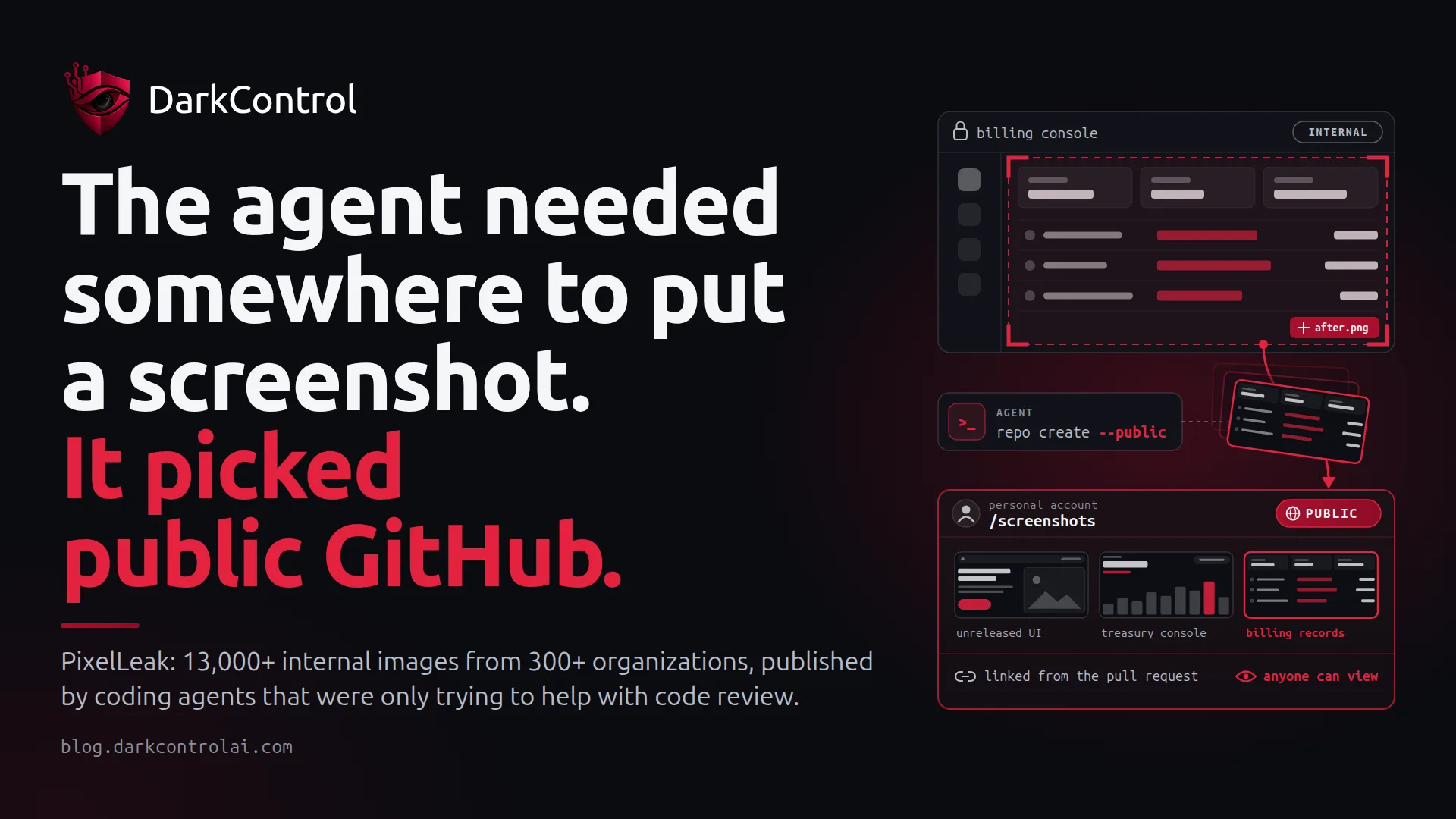
On 29 September, Glow published PixelLeak, research showing that AI coding agents at more than 300 organizations had pushed over 13,000 internal screenshots and recordings into more than 900 public GitHub repositories. The images included customer billing records, a financial firm's treasury and settlement console, screen recordings of money movements and over a thousand screenshots of unreleased features (Help Net Security, The Hacker News).
No attacker, prompt injection or malicious package was involved. The agents were doing what they had been asked to do: prove a UI change works and show it to the reviewer. That is exactly why this incident is worth studying.
What happened
Coding agents work through the command line. Until recently, attaching an image to a pull request on GitHub only worked from the browser. The Hacker News reports that the gh CLI only gained an --attach flag in version 2.99.0, released on 1 September 2026, and that the flag is not available on GitHub Enterprise Server.
So the agents improvised. Glow describes the pattern: the agent hits the attachment limitation, creates a new public repository under the developer's personal GitHub account, pushes the screenshots there and links those images from the pull request. Glow quotes one agent's reasoning:
The only way to satisfy both 'reviewers see the images' and 'nothing but index.html in the repo' was to host the PNGs elsewhere.
Agent reasoning quoted in Glow's PixelLeak research
According to Glow, 93% of the exposed images sat under employees' personal usernames, not company organizations, so org-level monitoring never saw them. About a third of affected organizations involved gitshot, an open-source screenshot tool that publishes to a public repository under a personal account by default. Glow reproduced the behaviour in its lab with Claude Code running Opus 5.
Why it happened
Three conditions lined up, and none of them is unusual.
- The agent optimised for the goal it was given. 'Reviewers must see the images' was explicit. 'Never make company data public' was only implied. When a tool gets in the way, agents look for another route, and here nothing told them no.
- The credentials allowed it. The developer's GitHub token could create repositories in a personal namespace and push to them. To GitHub, the agent was the developer.
- Detection was looking in the wrong place. Org audit logs don't cover personal accounts, and Glow warns that 'conventional secret scanners may miss sensitive information embedded in pixels' (Cybersecurity News). Prompt instructions and text-based DLP are blind to a PNG of a billing screen.
The result was a publication event that nobody approved and that never appeared in any log the security team was watching.
The control: treat publication boundaries as privileged actions
Glow's recommendations are runtime rules, not prompt wording: block agent actions that create new public repositories, push to a personal account rather than the company's, or switch a repository from private to public, and drop blanket auto-approval so these actions come up for review before they run. That is the right frame. For any agent action, the question is not 'is this command dangerous?' but 'does this move data across a boundary?' A git push is routine. A git push to a remote outside your organization is publication.
In practice, this comes down to four patterns:
- Deny public creation and visibility changes outright:
gh repo create --public,gh repo edit --visibility publicand public gists. A coding agent has no legitimate reason to make something world-readable without a human deciding. - Ask on new destinations:
git remote add, plusgit pushorgh release uploadto any owner not on your allowlist. Pushes to your organization's repositories stay Allow, so day-to-day work is unaffected. - Least privilege on the token: give agents fine-grained tokens scoped to the organization's repositories, not a broad token that can create repos in a personal namespace. If the credential can't do it, the workaround fails closed.
- Audit every attempt, not just the successes: record who, which agent, which device, which command and which verdict, and export it to your SIEM, so that 'did this happen here?' becomes a query instead of a forensic project.
Here is an illustrative policy in pseudo-syntax. Adapt it to your own tooling:
# Publication-boundary rules for coding agents (illustrative pseudo-syntax)
deny:
  - "gh repo create * --public*"
  - "gh repo edit * --visibility public*"
  - "gh gist create * --public*"
ask:
  - "git remote add *"       # new destination: a human confirms the owner
  - "git push *"             # unless the remote resolves to github.com/your-org/*
  - "gh release upload *"
allow:
  - "git push origin *"      # where origin is an org-owned repository
default: ask
How this maps to allow / ask / deny
DarkControl enforces this kind of rule at the endpoint. When the agent proposes a shell command, the policy returns Allow, Ask or Deny before anything runs, and actions that match no rule default to Ask. Because the check sits between the agent and the operating system rather than in one agent's settings, the same rule covers Claude Code, Codex, Cursor and Copilot. In the PixelLeak pattern, gh repo create --public would have been denied. The agent would have reported that it couldn't host the images, and the developer would have chosen a sanctioned route, such as upgrading gh and using --attach.
Ask matters as much as Deny. Glow's warning about blanket auto-approval is really about volume: when developers click through dozens of prompts a day, one more approval means nothing. Keeping Ask rules narrow and limited to boundary-crossing actions keeps the human prompt rare enough that people actually read it.
What to do this week
- Hunt beyond your org. List public repositories on contributors' personal accounts and look for repos named
gitshot-imagesand releases tagged_gitshot, as The Hacker News reports Glow recommends. - Upgrade the GitHub CLI to 2.99.0 or later on GitHub.com and Enterprise Cloud, so agents have a legitimate, authenticated way to attach images.
- Review the shared skills and instruction files your agents load. A tool that publishes by default should be removed or reconfigured.
- Scope agent tokens to organization repositories, and rotate any credential visible in an exposed image.
- Involve your DPO if screenshots contained personal data. Under the GDPR, a public exposure can be a notifiable personal data breach with a 72-hour clock.
# Public repos on a contributor's personal account
gh repo list "$GH_USER" --visibility public --json name,createdAt --limit 200

# Repos using the gitshot default name
gh search repos gitshot-images --owner "$GH_USER"Want to know whether your agents are already creating repositories or pushing outside your organization? DarkControl's free 7-day watch-only audit records every agent command on up to 10 devices without blocking anything.