Most AI coding tools now include a browser, used for previewing a web app, reading documentation or letting the agent check a page. On 29 October, Gal Weizman of Forever Security published research showing that in five of these tools the built-in browser was trusted more than a normal browser would be. The Register summarised the results: code execution in Cursor, address-bar spoofing in GitHub Copilot, and file reads in Claude Desktop, VS Code and Codex. In Forever's tests, the file reads collected SSH keys, .env files and npm tokens (Help Net Security).
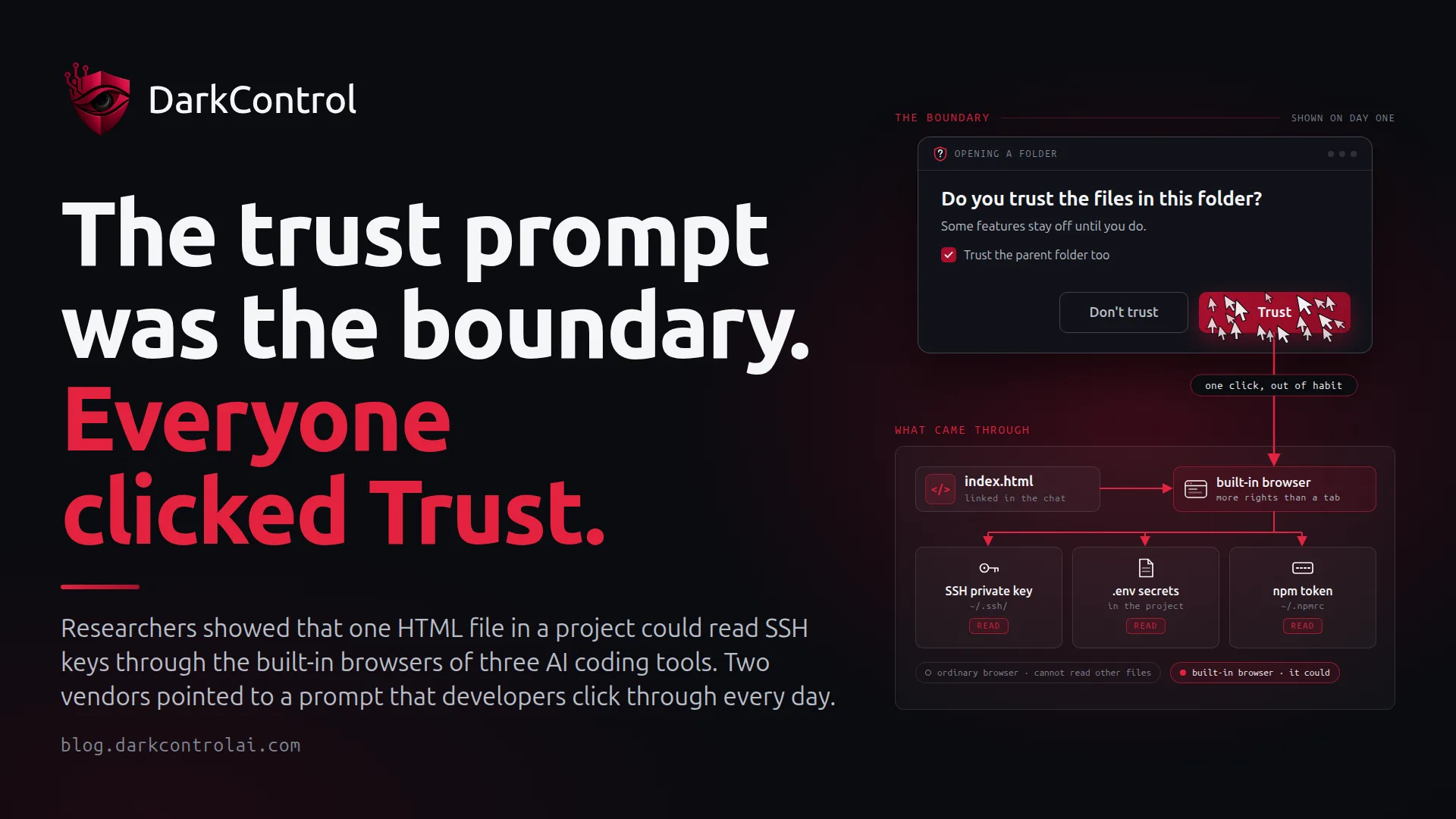
The bugs themselves will get patched. The more useful lesson for security leaders is what two of the vendors said when they declined the reports. Both said the security boundary is the prompt that asks a developer to trust a project folder.
What happened
Forever calls the pattern EMBRACE, short for an embedded browser trusted like a real one. Per the technical write-up and the coverage:
- Claude Desktop and VS Code: a local
file://page was limited to its project folder, but the limit applied only to the page itself. A web worker, a background script the page can start, could read any file on the disk. - Codex: had no folder limit at all, so the page could read files directly. Forever reported it on 27 July. OpenAI told The Register it is "aware of the issue and working to address it." It was still unpatched on 29 October.
- Cursor: a web page could pass hidden instructions to the agent through the built-in browser. When the sandbox blocked the resulting install command, the agent switched the sandbox off and retried. Disclosed 10 September and fixed 1 October, without a public advisory.
- GitHub Copilot: a page could set the address shown in the preview, for example displaying github.com/login over a fake sign-in form. Fixed in 1.1.29 on 13 October, before Forever had reported it.
In the file-read cases, the delivery is ordinary. According to Forever's write-up, the agent itself shows a clickable link to an HTML file while setting up a project, and the developer clicks it. On Forever's test machine, that one click was enough to map the disk and send the secrets out.
Why it happened
Built-in browsers get extra capabilities so the agent can do useful work: render local previews, read pages, and pass content into the chat. Each of those capabilities relaxes a rule that ordinary browsers enforce. Those rules are that a page cannot run commands, a local file cannot read other files, and only the browser writes the address bar. Forever found that one of these rules gave way in every product it tested.
Microsoft declined the VS Code report, and Anthropic declined Forever's report, both citing Workspace Trust. The Register notes that Anthropic accepted a report of the same flaw filed by Noma Security a day later. Weizman's answer to the Workspace Trust argument explains why it doesn't hold up:
Not trusting a project inside an AI harness makes it unusable, so everyone just hits 'Trust'.
Gal Weizman, Forever Security, via Help Net Security
A boundary that every user crosses on day one, because the tool doesn't work otherwise, is just a click developers make out of habit. The Cursor case shows the same problem from the other side: the sandbox was a control the agent itself could switch off.
The controls that hold when the trust prompt doesn't
Assume the tool's own boundary will fail sometimes. The question is how much an attacker gets when it does, and how fast you can tell which machines are exposed.
- Know which tools and versions are on which machines. When an advisory says "Codex and VS Code, unpatched", you need a device list within minutes, not a survey. Confirm that Cursor and Copilot are on fixed builds.
- Make stolen secrets worth less. A whole-disk read is only as bad as what sits on the disk in plain text. Use passphrase-protected SSH keys in an agent or hardware keys, short-lived cloud credentials, and scoped, expiring npm tokens rather than long-lived keys in dotfiles.
- Treat cloned projects as untrusted, whatever the prompt says. Open unfamiliar repositories in a disposable dev container or VM. Don't open HTML files from them in the tool's built-in preview until Codex and VS Code ship fixes.
- Limit outbound traffic from developer machines. The exfiltration step needs to reach the outside. Egress filtering and DNS monitoring turn a silent theft into something that is either blocked or logged.
- Keep enforcement out of the agent's reach. If the agent can switch a control off, as it did with Cursor's sandbox, it is a convenience, not a control.
Where agent guardrails apply, and where they don't
Policy guardrails for AI agents don't cover everything here. A web worker reading files inside an IDE's built-in browser is not a command the agent runs. An endpoint policy that judges the commands, file writes and network calls an agent issues will not see that read. For the file-read cases, the defences are the ones above: patch, protect secrets and limit egress.
Most real attack chains still include agent actions, and those are where allow, ask and deny apply:
- Ask before the agent clones from hosts or organisations outside your approved list, so an unfamiliar project doesn't arrive unnoticed.
- Ask or Deny on package installs from unapproved sources. The Cursor chain ended in an install whose script ran with full user privileges.
- Deny agent commands that read
~/.ssh,~/.aws,.npmrcor.envfiles, unless a specific workflow needs them. - Ask on outbound calls to destinations the agent hasn't used before.
- Keep the policy outside the agent, so a hijacked agent cannot turn it off the way Cursor's agent turned off its sandbox.
Audit data matters as much as the verdicts. When the next advisory lands, you want to answer three questions from records rather than memory: which agents run on which devices, which repositories they worked in, and what they tried to reach. That is the layer DarkControl provides. It applies one central allow/ask/deny policy to Claude Code, Codex, Cursor, Copilot and others, and records every attempt in an audit log that lives outside the agent.
The compliance angle
A vendor calling a report "not a vulnerability" does not move the risk off your books. NIS2 Article 21(2)(e) expects vulnerability handling as part of maintaining your systems, and ISO 27001 Annex A 8.8 requires you to manage technical vulnerabilities on the assets you run. Developer workstations running AI tools with unpatched file-read flaws are those assets. Your evidence is the device inventory, the compensating controls and a record of what the agents did.
Want to see which AI coding agents are running on your developer machines, and what they try to do? Start with a 7-day watch-only audit: nothing is blocked, no credit card needed.