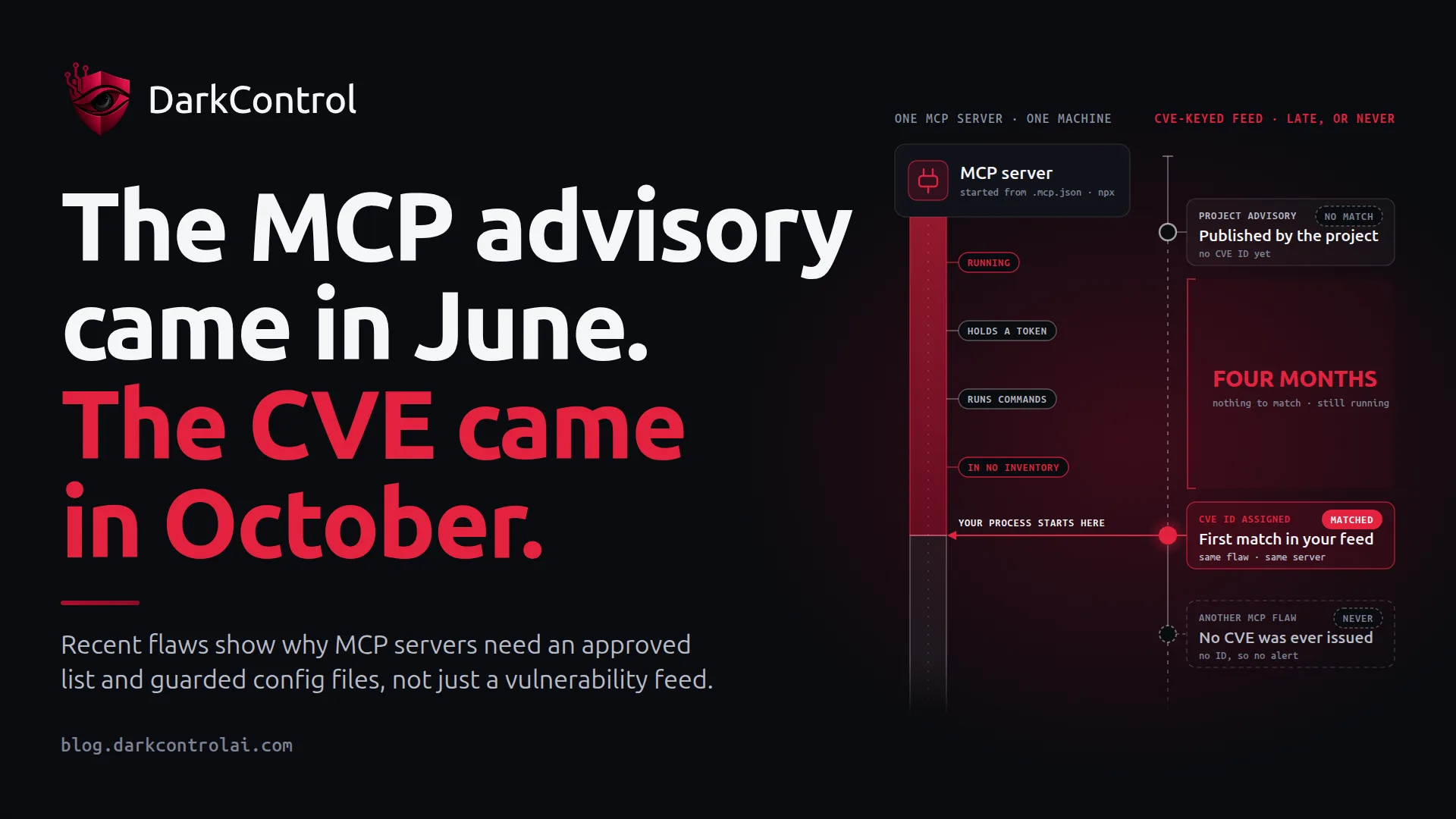
If your vulnerability process starts with CVE IDs, it would have met a critical flaw in the MoLing MCP server about four months after the project's own advisory. It would never have met a similar-severity flaw in opencode, because that one has no CVE.
We found no reports of in-the-wild exploitation for the flaws below, so this is not a breach story. It is a process problem worth fixing before there is one: Model Context Protocol (MCP) servers hold real credentials and run real commands, and many organisations cannot say which ones are on their machines.
What happened
- gitlab-mcp (CVE-2026-61560, CVSS 9.8). In SSE mode, this third-party GitLab MCP server exposed its tools with no authentication, and its
upload_markdowntool would read any file path it was given. The GitHub advisory says anyone who could reach the port could take the server's GitLab token and the owner's access, including CI/CD secrets and deploy keys. It also calls this the default configuration for Docker deployments. The advisory is dated 22 June. The CVE was published on 15 September, 85 days later. - MoLing (CVE-2026-62863, CVSS 9.6). In SSE mode this computer-use MCP server had no authentication and sent a wildcard CORS header, so any web page could read a session ID and send tool calls. The CVE record is blunt: "Binding only to loopback does not prevent this browser-mediated attack." The project's advisory is dated 27 June. The CVE record is dated 30 October, 125 days later.
- opencode (no CVE). Pillar Security showed that a remote MCP server could hide a PowerShell subexpression inside a valid
https://OAuth URL. On Windows and WSL it ran during sign-in, with no user consent. Versions 1.0.137 to 1.18.32 are affected, and 1.18.33 fixed it on 28 September. The vendor issued no advisory and requested no CVE, telling the researchers that "trying to deal with a malicious MCP server is outside our threat model." - Copilot for Visual Studio and SSMS (CVE-2026-103572, CVSS 8.8). This one did get a prompt CVE, but it shows how a server can arrive without anyone choosing it. Johann Rehberger found that a trailing dot in a filename got past the check protecting
.mcp.json, because Windows drops the dot when it writes the file. A hijacked agent could then register an attacker's command as an MCP server for the IDE to launch. Microsoft patched it on 13 October.
Why it keeps happening
MCP servers fall between inventories. They are often started from a JSON file in a repo or home directory, through npx or a container. That means they may never appear in a lockfile, an asset register or a software catalogue. The dependency scanner watches the application. The server runs next to it, usually holding a token.
Identifiers are optional. Tools that read GitHub advisories directly may have seen the gitlab-mcp and MoLing issues sooner, but anything keyed to CVE IDs had nothing to match for months. For opencode, Pillar's advice is to inventory installations directly, because scanners and dependency alerts will not flag the flaw without a CVE. A vendor can reasonably define its own threat model, but when it does, the risk moves to whoever configured the server.
Local does not mean safe. Developers often treat a port on 127.0.0.1 as private. The MoLing case shows a browser can bridge that gap when a server neither authenticates requests nor restricts origins. The gitlab-mcp Docker case is worse: per the advisory, the process ran as root with its port mapped to all interfaces.
Config is code. A line in .mcp.json is a command your IDE will run. If an agent can write that file, a prompt injection can become a persistent foothold, which is why the Copilot flaw matters beyond the Windows filename quirk.
The pattern that prevents it
The fix is to treat MCP servers like any other privileged software, with an owner and a record. The Cloud Security Alliance's research note on the opencode and Copilot flaws points the same way, recommending approved server lists, remote servers pinned to known origins and human review of agent-written configuration.
- Keep an approved list. For each server, record the owner, source, pinned version, transport and credential scope.
- Inventory from the endpoint. Manifests will not show a server someone added to a home-directory config last Tuesday.
- Watch advisories at the source. Subscribe to each approved project's GitHub security advisories rather than waiting for the CVE.
- Scope every credential. Give each server its own narrow, short-lived token. A read-only token for one project limits what a stolen token can do far better than a developer's personal token.
- Prefer local stdio over network transports where you can. Both critical server flaws above needed SSE mode. Where you need SSE, require authentication, run as non-root and do not bind to all interfaces. For gitlab-mcp, that means 2.1.27 or later with
SSE_AUTH_TOKENset, as the maintainer recommends. - Require review for config changes. Treat agent settings and MCP files as privileged, and test your path checks against Windows forms such as trailing dots.
A first inventory pass can be this simple. It is a starting point rather than a complete list, so adapt the paths to the agents you run:
# Linux, macOS or WSL: find MCP configs and running MCP containers
find "$HOME" -type f \( -name '.mcp.json' -o -name 'mcp.json' \) \
  -not -path '*/node_modules/*' 2>/dev/null
grep -s 'mcp_servers' "$HOME/.codex/config.toml"
opencode mcp list
docker ps --format '{{.Names}} {{.Image}} {{.Ports}}' | grep -i mcp
Where allow, ask and deny fit
Rehberger's conclusion is the right design test: "Security controls around agents must hold even when the agent itself is compromised or misaligned." That means enforcing policy outside the agent, which is the layer DarkControl works at. Its endpoint agent checks each shell command, file write and network call against central policy, returns a verdict and logs the attempt. Applied to MCP, a policy could look like this:
- Allow: starting approved servers at pinned versions, such as an exact
package@version. - Ask: anything unmatched, including the first run of a new MCP package, a new outbound destination or a write to an MCP or agent settings file. A human sees the change before the IDE acts on it.
- Deny: agent commands that dump credential files or process environments, and installs from outside your approved sources.
- Audit: keep every attempt, including refused ones. When an advisory lands, you can search for which machines' agents tried to install or add that package, rather than asking in a team chat.
- Least privilege: set an organisation-wide baseline, then grant exceptions by department or group. The platform team may need a GitLab MCP server; most teams may not.
Not sure what your agents are running? DarkControl's free 7-day watch-only audit blocks nothing and shows what they attempt across up to 10 devices, with no credit card needed. Book a demo to see how it fits your environment.